
Know what you have, what you need and where margin is moving
Operate connects what you sell to what you hold, so counts, recipes, orders and invoices explain each other.
Screens show Purple Operate with a demonstration business and sample data.
The working day
Margin moves before anyone sees it
Counts on a clipboard
Stock is counted on paper and typed up later, if at all.
Orders from memory
Replenishment depends on who is in and what they remember.
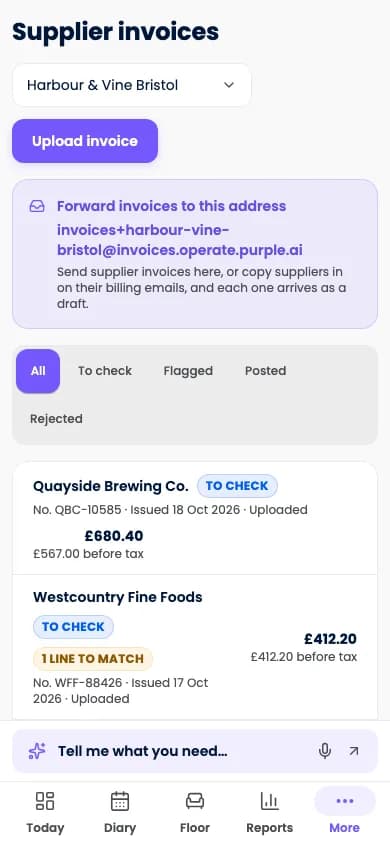
Invoices do not match
What was ordered, delivered and billed is reconciled by hand.
Recipes
From recipe to menu to count
Recipes connect ingredients to what is sold, to what each dish contains and to what the count should show.
- Recipes, yields and sub-recipesUnderstand the cost of each item you sell.
- Ingredient allergen roll-upConfigured ingredient information carries through to each menu item.
- Theoretical versus actual usageExpected consumption is compared with counts, to prompt earlier investigation of waste or loss.
Purchasing
Orders prepared, people approve
Order drafts come from par levels and the forecast, and approvals apply spending limits.
- Order draftsReplenishment suggestions cut repetitive order preparation.
- Purchase-order approvalsSpending limits and review make purchasing accountable.
- Deliveries and invoice matchingWhat was ordered, received and billed is connected.
In scope
Stock, purchasing and margin
The scope across supply. Flash financial views depend on complete, correctly mapped inputs and are not audited accounts.
- Counts, transfers and waste reasons
- A clearer explanation of variance.
- Retail and professional stock
- Products sold are separated from products used in service.
- Supplier catalogues and price changes
- Purchasing context that is easier to review.
- Invoice capture
- Supplier paperwork becomes reviewable records with less typing.
- Cellar management
- Wet-stock workflows for pubs and bars.
- Stock by item and location
- See where stock is held.
- Budgets and flash profit-and-loss views
- Available revenue and cost signals together.
- Food-safety logs and checklists
- Routine checks get a visible record.
Good to know
What applies to stock and safety tools
- Food-safety, allergen and compliance tools support staff processes. They do not replace the operator's duties.
- Forecast-led order drafts are estimates. People approve orders and new suppliers.
- Flash profit-and-loss views are management information, not audited accounts.
Questions
Questions about stock
Does Operate place supplier orders automatically?
It drafts them from par levels and the forecast. A person approves, within the spending limits you set.
Can it tell me where stock is going missing?
It compares theoretical usage from recipes and sales with your counts and waste records, so a variance shows up earlier and with more context.
Does it manage allergens?
Ingredient allergen information you configure rolls up into menu workflows to keep it consistent. Your team remains responsible for what is served and said to guests.
More of the working day
Bookings and scheduling
A diary that checks people, spaces and equipment together.Till and payments
Keep the order, the kitchen and the bill connected.Guest ordering and events
Order and pay, collection, vouchers, tickets and private hire.
See your own working day in Purple Operate
Tell us what you run and what you use today, and the Purple team shows you Purple Operate on a venue like yours.