
Build the shift around demand
Operate puts the rota beside the bookings and the forecast, so staffing is planned from the same view of expected trade as everything else.
Screens show Purple Operate with a demonstration business and sample data.
The working day
The rota is written before anyone looks at the diary
Every week starts from blank
Managers rebuild a similar rota by hand, then adjust it by message.
Labour cost appears afterwards
The cost of a shift is clear at payroll, not when the rota is published.
Changes are informal
Swaps, leave and timesheet questions arrive in personal chats and get missed.
The team and the rota
A draft to review, not a blank page
Operate knows who is on the team, their roles and skills, so templates and demand-led drafts start from the right people with the cost attached.
- Demand-led draftsForecasts from operational demand prepare a rota draft for manager review.
- Labour cost beside forecast salesScheduling trade-offs are visible before publication.
- Open shifts, swaps and leaveStaff have a structured route to request changes.
Forecasts are estimates and depend on data quality. Publishing a rota stays a human decision.
Time and pay preparation
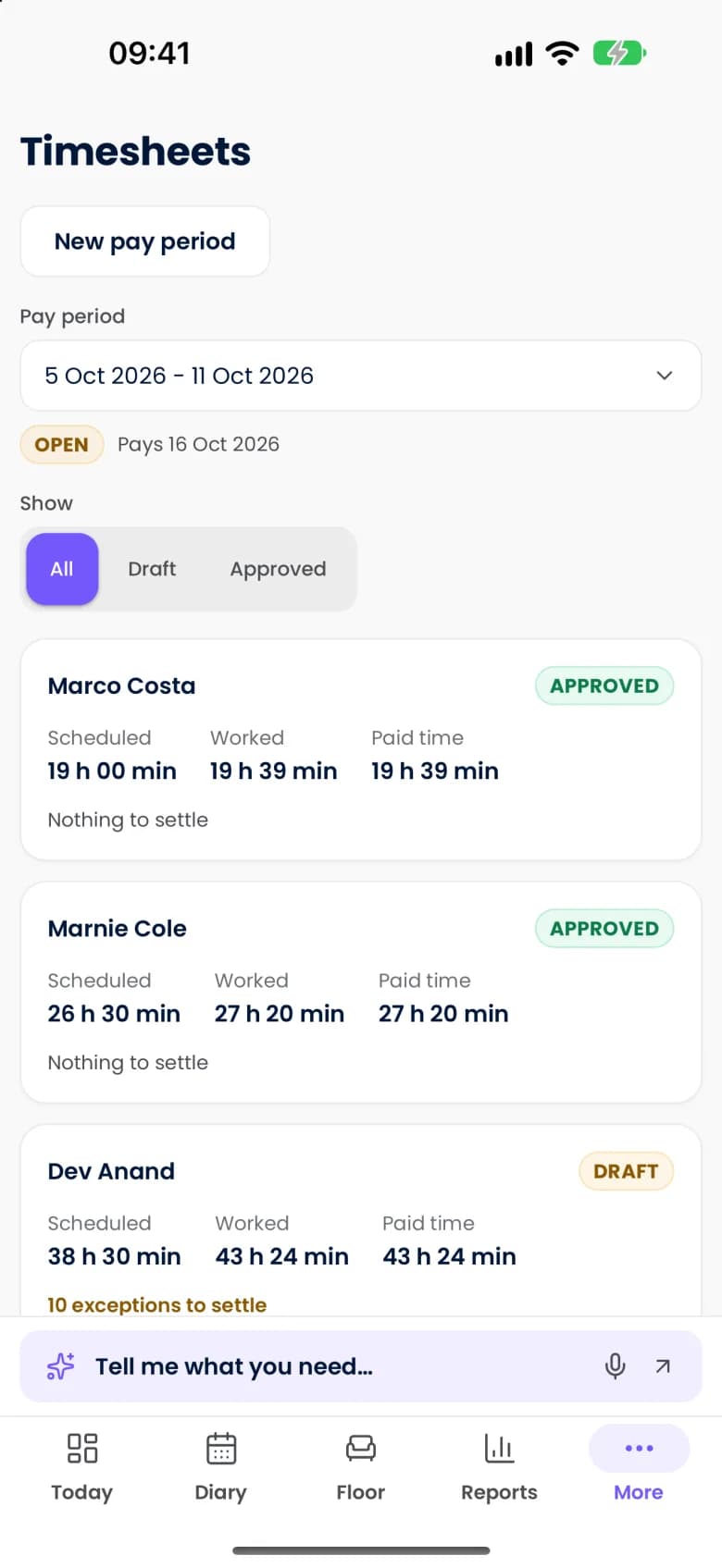
From clock-in to an approved export
Actual hours are matched to the rota, and exceptions wait for a person.
- Clock-in and attendanceWork is recorded through supported devices.
- Timesheet matchingPunches that need review are surfaced, so approval is manageable.
- Tips and commissionsConfigured allocation rules produce clear statements for the team.
In scope
Staff, rotas and pay preparation
The scope across the team. Pay rules are configured for your jurisdiction and confirmed at setup.
- Staff profiles, skills and roles
- Operating information about the team in one place.
- Working-time and pay-rule warnings
- Configured jurisdiction-specific risks get earlier attention.
- Tip and tronc records
- Configured allocation, statements and record keeping.
- Service and retail commissions
- Eligible paid lines connect to commission rules.
- Payroll exports
- Approved data is prepared for supported payroll formats.
- Staff self-service
- People see their own shifts and related records.
- Hiring and onboarding workflows
- Starter details, documents and sign-offs are organized.
- Training and expiry reminders
- Evidence that needs renewal is highlighted.
Good to know
What applies to staff and pay
- Operate prepares payroll exports. Processing payroll through a partner is a separate arrangement.
- Warnings reflect the rules configured for your jurisdiction. They support, and do not replace, your own legal duties.
- People approve pay and timesheets, decide right to work and allocate tips. The AI team does not.
Questions
Questions about staff and rotas
Does Operate write the rota for me?
It prepares a draft from templates and expected demand, with labour cost beside forecast sales. A manager reviews, changes and publishes it. Publishing is always a human decision.
Does it run payroll?
Operate prepares approved hours, tips and commissions as exports for supported payroll formats. Running payroll itself is done by your payroll provider.
Can staff swap shifts themselves?
Staff can request swaps, pick up open shifts and request leave through self-service, and a manager approves.
More of the working day
Bookings and scheduling
A diary that checks people, spaces and equipment together.Till and payments
Keep the order, the kitchen and the bill connected.Guest ordering and events
Order and pay, collection, vouchers, tickets and private hire.
See your own working day in Purple Operate
Tell us what you run and what you use today, and the Purple team shows you Purple Operate on a venue like yours.