
Hire help for the work that keeps coming back
Choose the jobs. Set the limits. See the work. Each AI job has defined responsibilities, a human supervisor, a venue scope and a monthly credit ceiling, and always identifies itself as AI.
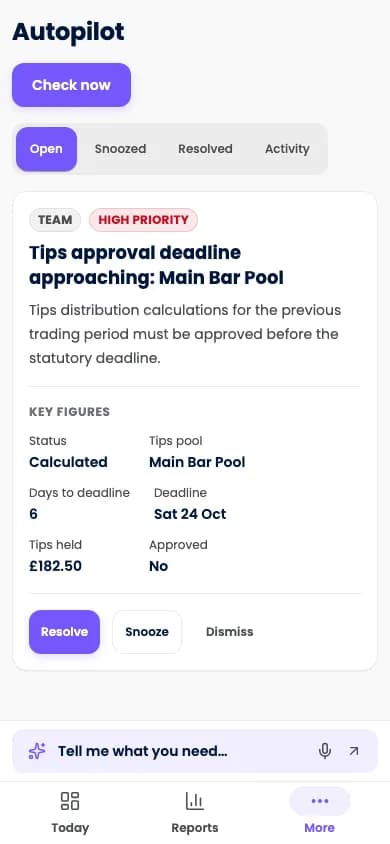
Screens show Purple Operate with a demonstration business and sample data.
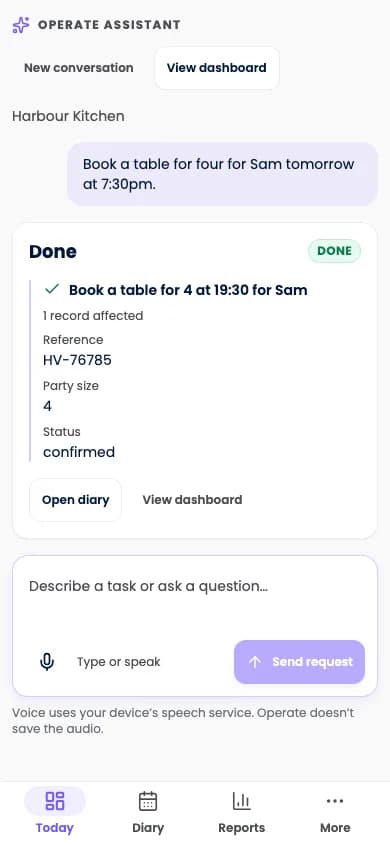
The working day
Your team is serving. The admin is still arriving.
The phone rings during service
Bookings and questions go unanswered at the busiest time.
Preparation repeats every week
Rota drafts, supplier orders and closing checks are rebuilt by hand.
Nobody is watching the gaps
A quiet slot, a stock shortfall or an expired certificate is noticed late.
How a job works
A role, a supervisor and limits
A manager chooses a role, its venue scope, a supervisor and a monthly credit ceiling.
- Shadow mode by defaultA new job records what it would do and changes nothing until an authorised person moves it on.
- Supervised, then boundedJobs move to supervised work, then to playbooks with explicit permitted actions and spending bounds.
- Pause, resume or releaseA person can stop a job at any time.
Approvals
Review the draft. Approve what matters.
Proposed work arrives as a preview, with estimated credits where applicable.
- A preview before actionSee the draft rota, order or message before it goes anywhere.
- An activity trailWhat ran, why and with which approval.
- Usage against the ceilingCredits used by each job, against its monthly limit, with overage off by default.
Voice receptionist
Your team is serving. The phone is ringing.
An identified AI receptionist checks live availability, answers venue questions, makes eligible bookings and hands exceptions to your team. The receptionist does not take card details by voice. It offers supported payment links. Availability depends on telephony, provider services, routing and credits.
Live availability
Bookings and moves are made against the real diary.
Prices from the system
It quotes what your catalogue says and escalates anything outside approved rules.
A fallback you configure
When paused, failing or out of credits, calls fall back to your own line or voicemail, subject to configured and tested routing.
In scope
The jobs you can hire, and where people stay in charge
Each job's enabled capabilities are confirmed for your venue before it goes live.
- Receptionist
- Answers configured calls, books or moves appointments and answers venue questions. Refunds, exceptions and anything outside approved rules go to a person.
- Reservations manager
- Watches the diary and prepares waitlist offers, reminders and table assignments. Booking-policy changes need a person.
- Rota manager
- Drafts from demand, highlights coverage gaps and prepares open-shift offers. Publishing and changing published rotas stay with people.
- Buyer
- Watches stock, drafts orders and flags supplier changes within approved purchase limits. New suppliers and spending beyond bounds need approval.
- Bookkeeper
- Prepares closing work, matches invoices and prepares exports. Closing a trading day and exporting to accounts each need a person's approval.
- Kitchen manager
- Prepares prep lists, highlights waste and reminds teams about routine logs. Menu, allergen and live-price changes need human control.
- Revenue manager
- Identifies quiet slots and coordinates approved incentives with Purple Engage. New offers and live price lists need approval.
- Compliance officer
- Surfaces expired evidence and configured working-time or licensing warnings. People decide legal eligibility, pay and remediation.
- Front desk
- Assists with arrivals, room assignment and approved pre-arrival messages. Folio refunds and rate publication need people.
- Housekeeping coordinator
- Drafts and rebalances housekeeping tasks within configured operational permissions.
- General manager
- Prepares a morning brief, a weekly review and priorities across jobs. It proposes and explains; it does not gain wider authority.
Good to know
What the AI team never does
- It does not allocate or read tips, approve pay or timesheets, or decide right to work.
- It does not change its own limits or connect financial accounts.
- It does not move money outside approved rules.
- It does not read clinical records.
- AI jobs are optional and use credits. Each one starts in shadow mode.
Questions
Questions about the AI team
Is the AI compulsory?
No. Hiring AI jobs is optional, and the core screens are fully usable without an AI team.
Can the AI spend money or contact customers?
Only through capabilities you allow, with human approval or inside an approved, bounded playbook. Some actions always need a person, including pay, tips, refunds outside the rules and publishing a rota.
What does the AI team cost?
Jobs use credits from a pool shared with Purple Engage. You set a monthly ceiling for each job and overage is off by default. We confirm current credit pricing when we speak.
Will callers know they are talking to an AI?
Yes. The receptionist identifies itself as AI even when you give it a name.
What happens if the receptionist is unavailable?
When it is paused, failing or out of credits, calls fall back to your own line or voicemail, according to the routing you configure and test.
See your own working day in Purple Operate
Tell us what you run and what you use today, and the Purple team shows you Purple Operate on a venue like yours.